25 Comments
Guest *AmeliaMN* @ 2018-09-10 22:31:35 originally posted:
Thanks for this long and thoughtful post, Yihui! I love RMarkdown but not R Notebooks (or, Jupyter notebooks). I think some of that feeling is related to the different environments-- I like executing chunks from my RMarkdown and having the code show up in my Console (makes sense, I'm working in my current R session) but then knitting the document and seeing the beautiful final product, run through from start to finish. R Notebooks blur the line between me working and the final version, so the distinction between the session I'm working in and the new clean R session seems less clear. I don't like that for teaching.
Even though I love RMarkdown, I think it could be even better. The idea of scratch paper versus the final version of an essay is something I've been thinking about for a while, and I think software could do a better job of supporting (some thoughts in this: https://arxiv.org/abs/1610.00985). Maybe this crosses over with the environment/session stuff, but I think it's deeper than that. Could the "unit testing" and playing around be obscured in some way, so the final version is less "messy"?
I think this conversation would be great as a podcast episode or live conference "debate." Maybe you can get Joel to participate? I'm also happy to serve as a foil.
 yihui 2022-12-17 03:56:45
Thanks for sharing your thoughts! I just thumbed through your paper and will read the details later.
I forgot to mention that I don't know Joel personally. It was actually the first time I had heard of him when I saw his slides. He might be happy to do a podcast, but I'm a very slow thinker...
Originally posted on 2018-09-11 01:33:51
 giscus-bot 2022-12-17 03:56:52
Guest *Joshua Goldberg* @ 2018-09-19 05:41:52 originally posted:
This was in a book "slow thinkers." I can't remember which of the past 10 books or so I've read where it's mentioned. It was not the main theme, but found it interesting. An intellect was made to look inadequate because the interviewer (tv night host) had quick prepared remarks and questions, which the "intellect" stumbled on his feet. I guess the point is, we need slow thinkers like yourself. There's too much fast food going around. Anyway, I digress.
I enjoyed your post as usual. I have observed similar painpoints with my peers who enjoy python instead of R. And I just think "we don't have those problems...". At least not all of them.
AmeliaMN brings up a great point on the scratch paper / draft concept. I use Rmarkdown (never used notebooks). I have some embarassingly long Rmds. I need to develop a better workflow that favors modularlization, yet I still want to some how accomplish this with Rmd. Rscripts just feel impersonal when I'm doing data analysis.
Guest *Richard Careaga* @ 2018-09-11 00:58:10 originally posted:
That was a good read, thanks. It's not easy to address the same topic from the different perspectives of functionality, cognitive style and philosophical approaches interwoven. It's no surprise that it took you four days. My R approach has settled into write in console (R), get something potentially usable, cut and paste into an Rmd to explicate it and maybe someday it grows into a bookdown. In Python, I still do block commenting in source, mainly. One of the downers for me in Jupyter is that I haven't found a way to inline code the way you can in RMarkdown. Everything outside a cell is pretty insert.
yihui 2022-12-17 03:56:49I have intentionally avoided a potential (feature) war between the two types of notebooks in this post, and only said how those problems could be solved in R Markdown, but for inline code, yeah, you are not the only person missing this feature in Jupyter: https://minimaxir.com/2017/06/r-notebooks/
Originally posted on 2018-09-14 03:13:37
Guest *TC Zhang* @ 2018-09-11 01:18:09 originally posted:
Great read. Personally I find that Rmarkdown makes my life (and project) way easier than pre-Rmarkdown era. Good to know that most pain points in jupyter have been well addressed in Rmarkdown.
I didn't dive deep in python because python doesn't have an equivalent to Rstudio IDE, now it seems that its jupyter notebook falls far behind Rmarkdown as well.
giscus-bot 2022-12-17 03:56:46Guest *TC Zhang* @ 2018-09-11 01:38:45 originally posted:
One thing I learned during using Rmarkdown is that you should split Rmarkdown files into tangible and small pieces.
When I first began to use Rmarkdown to report something, I injected ~30 chunks and 10~15 figures in one single Rmarkdown file, which ended up with 1200+ lines.
After six months, I find it a pain in the ass while trying to reuse a piece of code from that gigantic Rmarkdown.
Guest *Alison Hill* @ 2018-09-11 02:52:12 originally posted:
Just want to say I really enjoyed this post- I wondered the same thing about R Markdown when I saw the anti-notebook sentiments online in response to Joel's slides/talk- not having used "notebooks" per se I wasn't sure if the same criticisms applied to my favorite tools. And about midway through reading your post I actually paused "The Great British Bakeoff" in the background, which tells you I went from casual skimming to a deep read :) I always enjoy your short blog posts but there were lots of easter eggs in here that were fun to stumble upon!
Guest *Carl Boettiger* @ 2018-09-11 03:39:10 originally posted:
Great post, Yihui. I thought Joel made some very good specific points in his talk that were easily lost as so much of the discussions I saw (both on twitter and email threads) were over-generalized. Joel's talk didn't help the matter of course by mixing issues that were inherent to notebook design (notebook != software development environment), issues inherent only to Juptyer/Mathematica style notebook design (where input == output), and issues that weren't inherent problems at all, just features waiting to be added (e.g. poor auto-complete). Thus I really enjoyed your post which did a nice job of distinguishing these things.
Having taught semester-length classes in both Jupyter Notebooks and R Markdown for three years now, I think Joel's primary complaint: the 'hidden state' or 'order of execution' problem, is very real. Yes, it also exists in plain scripts, I've seen plenty of people execute their scripts in non-linear order -- but it's significantly worse in notebook formats. In R, we are largely saved from this by the need to hit the knit button to create a pretty output document. This makes the problem somewhat temporary -- by the time my students remember to knit their document to create an output, they must confront their hidden state issues just to get the output .md up on GitHub for grading! (errors which have meanwhile been breaking their travis checks, hehe, not that they care about those until after the first assignment is graded!) In jupyter, the notebook already shows up on GitHub as soon as it is saved, and so it is much easier to forget this.
I would note that RStudio's new "Notebook" feature replicates the Jupyter property of creating an output document (the .nb.html) just by saving the .Rmd, without pressing knit. Personally I don't like this; students make many more hidden state errors this way, just like they do in Jupyter notebooks. This is a somewhat subtle software development issue that I felt was easily lost when "hate notebook" was aimed variously .ipynb, .Rmd, and .Rmd+.nb.html.
I've always found it interesting that Jupyter and R Markdown share such independent evolutionary roots, and to what extent these have and haven't converged. Jupyter/ipython"notebooks" trace lineage to Mathematica's "notebooks", as underscored by that popular recent piece in The Atlantic (https://www.theatlantic.com/science/archive/2018/04/the-scientific-paper-is-obsolete/556676/), with absolutely no mention of Knuth or Literate Programming. This history is clear in both the names ("notebook" vs "knit" and your other hat-tip to Knuth's terms), and RStudio has now echoed that in likewise using "notebook," invoking python/mathematica rather than Knuth, for it's format which loses the more distinction of input vs output documents.
I think another distinction that arises from this history is also one you highlight in the chunk options. Because R Markdown historically has a notion of 'output' document, chunk options have always been a first-class citizen, one which you richly expanded upon when you also expanded our flavor of output formats (thanks to the brilliant union with pandoc). This can be done in Jupyter too of course, it just isn't well supported and isn't the norm -- since .ipynb notebook is already an output. As you note above, chunk options address several of Joel's concerns.
Lastly, there's the large handful of complaints that really come from Jupyter not being a mature IDE with polished autocomplete and rich software development interface. Jupyter isn't the flagship product of a large and successful company, so perhaps it's not surprising that it features a more bare-bones environment which intentionally leaves most feature development up to community plugins. So Joel's picking on some of it's lack of polish and perfection felt quite unfair, and I think the JuypterLab development addresses more of these IDE needs. I don't have much experience with the python methods of packaging & distributing software, but I do really appreciate the ease in which we can mix R package + Rmd notebook / vignette. We have plenty of examples of such "compendiums" in R, but I haven't seen much of the equivalent in Python that combines a .ipynb notebook for documentation with .py scripts for longer functions and setup.py for dependencies & metadata...
Guest *Hugh Parsonage* @ 2018-09-11 04:06:01 originally posted:
This post is rich in insights. Thank you.
I just wanted to remark on the complaint about out-of-order execution if I've understood it correctly. One of the biggest lessons I've learnt from knitr is to ensure as far as possible my code chunks are idempotent (after sourcing). That is, once you've run your code you can run and modify any code chunk individually with a degree of confidence that the output is the same as from the full knit.
Guest *Miao YU* @ 2018-09-11 04:13:16 originally posted:
My experiences might be an example to show some usages of notebook. I always have two versions of Rmd for one project. One is the Rmd with dirty code and all the unsuccessful exploratory data analysis. Another is a refined workflow which could generate report from the original data. All the repeated code would be made into a function at the very beginning code chunk or new functions in a package.
For me, the first one is the draft for myself and the second one is for reproducible research. I think it would be fine to share the second workflow Rmd since such workflow would help a lot for people without any idea about a new project. For the first one, I agree it's actually not reproducible and it might not need to be reproducible for a quick exploratory data analysis. However, it might be valuable as raw log file with markdown comments for oneself.
Guest *Miloš Djerić* @ 2018-09-11 06:20:06 originally posted:
This was a true pleasure to read!
Especially like the 3rd footnote (I actually stole the same line of reasoning from one professor about "political science")...
When I started learning R last year (and Rmd, notebooks), my biggest problem to understand was YAML header and options. It was clear and easy to modify basic things, obviously, but anything more from understanding what it does, how it does it, and what can be the options, to what are the rules for structure, how it can be passed to pandoc, etc. was quite difficult to understand, frustrating, and involved scavenging other people's templates and markdowns on github. If there was something one third as informative as your "knitr options" page, it would be incredible.
Regarding R notebooks, there is one rather minor thing I come across -- in a bit longer files (e.g. more than 5 plots) it becomes very useful for me to collapse headers to keep the structure, outline, and flow clean - which is great and incredibly useful. But, after running preview (and sometimes maybe even next chunk, but I am not 100% sure), all the plots appear on top of collapsed headers. Even if the chunk output is collapsed, after preview all of them unroll and open.
I don't know if there's an option to stop it, but its a just a pesky nuisance (and only problem I can think of).
yihui 2022-12-17 03:56:48I heard your frustration with the too many options (worse, some belong to knitr, and some belong to Pandoc). With the recent R Markdown book, I hope it has become a little more obvious: https://bookdown.org/yihui/rmarkdown/output-formats.html
For the problem of plots floating around unexpectedly (even after collapsing the chunk output), I guess I have had the same pain. I don't understand why it happens (I'm not an IDE developer). Sometimes it is annoying enough to me that I have to close the Rmd file and re-open it. Thanks for your feedback!
Originally posted on 2018-09-14 02:50:49
Guest *Jose Manuel Vera* @ 2018-09-11 08:42:55 originally posted:
This post is Pure Gold. As a data scientist I use Rmarkdown notebooks a lot, but just for prototyping or exploratory analytics. As someone here has stated, my life is easier now than in the pre-notebook era, but I usually keep two different copies, one dirty for me, other for sharing results in a cleaner way. Started my career using python and Jupyter but quickly turned to R thanks to RStudio IDE. I think tool this makes the real difference between the python and the R world. Now I barely use python and really use posix and Rscripts por all the heavy data processing that sometimes is needed previously , and then rmarkdown/shiny for sharing results.
Guest *Russell Pierce* @ 2018-09-11 13:15:42 originally posted:
Yihui, no discussion of cache options in knitr? Does that mean they don't apply/can't come to notebooks? Might autodep=TRUE and dep_prev() at least partially be able to help save the execution order / state day?
yihui 2022-12-17 03:56:47Glad you brought it forward. That is an excellent topic deserving its own post! :)
Originally posted on 2018-09-14 02:44:31
Guest *Eric Lecoutre* @ 2018-09-11 13:59:50 originally posted:
Hi Yihui,
Thanks for this nice post. As you, I am not at all a Python guy (though more experience than writing only one stuff).
Though, I was curious enough to also carefully go through all the slides of Joel.
And I did agree with a good part of them considering my experience and what I see from others with Jupyter.
I really agree with you that RStudio markdown integration definitively address most of Joel concern.
In fact, I really am worried when I have to work with Jupyter.
I never had bad experience with R markdown (except when notebook mode was introduced, I prefere to see outputs in console/plot viewer than in "notebook").
I definitively hope that RStudio development pipe have some concern with Python :)
I am not a full open source mind guy, nor an anti- but can't say anything else than RStudio environment is nearly perfect, both for data analysts (your R environment) and R developpers (packages).
Guest *Pogrebnyak Evgeny* @ 2018-09-11 15:09:16 originally posted:
Great post with fair amount of repetition that makes it didactic in a good sense. I'm most attracted to Excel analogy, role of converters and IDE lock-in.
Excel to notebook analogy strikes me as thunder: Excel is xml now, notebook is json, and we should have guessed they leaning to each other, both on format (remotely) and on reactivity (closer), but also on case-by-case messiness.
Also rather surprised why tools like nbconvert and sweave/pweave do not save the day: on surface it does not look like a terribly complicated thing to put parts of comments to one cell and code to other cell. I must be missing something that explains why script-notebook converters are not widely used.
IDE lockin: I was an R user before starting python, but never used Rstudio. Got quite attached to Matlab-style interactivity in R, surprisingly the only python IDE that fully supports it is Spyder. I was just glad to read the IDEs affect the workflow in a deep way, and 'cultural' switching costs are high.
Thanks again for a toughtful post and advice.
Guest *Ariel Muldoon* @ 2018-09-11 15:54:18 originally posted:
Nice post. I followed some of the "notebook war" discussion but some of it didn't feel fully relevant to me and what I/my clients do. Your "software engineering" vs "data analysis" was spot on.
A couple common themes I've seen from folks talking about this involves 1., being unsure how to organize things in the newer Rmd tools and 2., liking the tools you already know and that you know work well for you.
It sounds like the "child documents" might really help with the first, at least for splitting things up. I haven't used this method, but I have definitely split tasks up into separate files much like I used to do with scripts.
In terms of the second, I started teaching a workshop for Notebooks/R Markdown in my college (explicitly teaching both interactive and batch) because I wanted students to have the option of an alternative workflow. I often default to scripts because that's how I learned R. I still like my source pane to the right of the console, too, because I learned R through the RGui. :-D But I think it's important for others to be exposed to alternatives so they can decide what works best for them.
Prior to Notebooks I only used Rmd files for making final products and scripts for analyses. Here's a few things that using the interactive Notebook format for analyses taught me:
Use many small chunks, often one per code task.
Add narrative for each of those many small chunks. It adds time to your work, but is worth it in the long run. From personal experience my future self will not remember what I saw in the plots or why I made the choices I did. Write things down! (The same is true for scripts, but the narrative in Notebooks is SO much easier to go back and read than comments in R scripts, plus you don't have to run the code to see the output.)
Add headers to each major section/subsection. This allows you to easily navigate the Rmd document when you come back to it via the document outline in RStudio.
The "Restart R and Run All Chunks" options is key. Definitely make sure everything runs properly before your final save/sharing.
Guest *burakbayramli* @ 2018-09-11 17:21:25 originally posted:
There are alternatives. I wrote this extension
https://github.com/burakbayramli/emacs-ipython
which allows developing Python code from inside Emacs, for markdown or tex files (buffers). The ipynb files of jupyter are not uneditable with an extenal editor, and their "binary like" format makes them very hard to merge, diff in version control systems. With my extension you always have the md or tex file. Images are saved as seperate files.
Guest *Philippe Grosjean* @ 2018-09-11 21:01:48 originally posted:
Excellent Yihui. I agree with most of what you say. However, there is a key point to consider: the notebook is just one component among others in a clean analysis. People tend to put everything in a single notebook, and that is why it is messy. Why do they do so? Because it is still too difficult for them to organise the work in a project, with different files (code, notebooks, etc.) that interact cleanly together. That interaction is hard to manage. Should you use make? Perfect tool, but too technical for many people. Something like Drake (https://github.com/ropensci/drake), once "simplified for the mass" will give the opportunity to better manage the workflow across different files inside a project.
Also worth to mention workflowr (https://jdblischak.github.io/workflowr/) that explicitly indicates in the knitted document if it was done in a reproducible way (as you say: all chunks run in order in a clean session), and can manage a "pool" of notebooks operating hand-in-hand together, so that they are knitted in the correct order automatically.
I think RStudio/R Markfdown/knitr (and, by the way, Jupiter/Jupyter lab also) would greatly benefit from the integration of such tools that would encourage to organise the analysis across different files, and manage the "inter-files workflow" cleanly. So, you could emphasize your most interesting conclusions in one notebook, and that notebook would be linked to other documents that contain all the (messy) details.
giscus-bot 2022-12-17 03:56:52Guest *Nicotinamide* @ 2019-04-21 01:24:32 originally posted:
Echoing the mention of drake. Drake has been a very useful tool for me and the team I'm working with to collaborate and to make sure that each run of code and knit of a document would be in a clean state. This ensures a reproducible workflow, and coupled packrat, makes sure that processes would run without a hitch from one laptop to another.
Guest *Hong* @ 2018-09-12 17:55:28 originally posted:
If I remember correctly, Joel is an advocate for functional programming, which might explain why he is very sensitive and against the state-related issues of notebooks. However, I do think by introducing a bit of functional programming concept (e.g. avoid in-place operation as much as possible), coding in notebook can work better. Regarding the more preferred batch mode in R, maybe it is the reason/result why there's less deep learning research using R, since it will be very unpleasant to rerun from scratch if you are playing around with a giant deep learning model..
Guest *Nathan Cook* @ 2018-09-13 00:19:39 originally posted:
"I only know that real sciences don’t have the word “science” in the names, such as chemistry, physics, and biology. They don’t call themselves “chemical science”, “physical science”, or “biological science”"
Absolutely! I've been saying this for years:
political science
social science
Guest *Martin Modrák* @ 2018-09-17 19:53:32 originally posted:
I like the post! The only point of minor disagreement is in your coverage of tests in notebooks, so I wrote a brief response if anyone's interested: http://www.martinmodrak.cz/2018/09/17/tests-in-r-markdown/
yihui 2022-12-17 03:56:51Thanks for your follow-up post. That was a really good one! I actually agree with your disagreement. My claim was too strong. Basically if you have expectations about the data, you can surely test them (since tests are essentially to check expectations are correct). A weaker version of what I meant is, expectations about the data are probably often less clear than functions in software.
Originally posted on 2018-09-18 18:58:22
Guest *Joe Kliegman* @ 2018-09-18 10:01:18 originally posted:
Thanks for this thoughtful analysis of Joel's talk! I agree with most of the points and arguments you make in the post and the fundamental idea that notebooks are not the same as IDEs and each is a tool useful for different applications.
In section "7. Notebooks hinder reproducible + extensible science", you mention packrat a solution for dependency management. In my experience packrat is a fantastic way to manage requirements on the 'package level', but it does little to control for dependencies on the R language level, system library level, or operating system levels.
One notebook solution that does incorporate dependency/requirement management at all levels is Nextjournal (nextjournal.com). I'm curious to know if you have used it and what you think about it as a way to address some of Joel's concerns about reproducibility.
yihui 2022-12-17 03:56:50I haven't used Nextjournal. Thanks for the link anyway!
Yes, packrat does have some limitations. It works best on the (RStudio) project level.
Originally posted on 2018-09-18 18:52:37
Guest *Vincent Carey* @ 2018-09-26 20:14:00 originally posted:
This post reminded me of a paper I published in 2001 in CHANCE,
in a section called "On the Edge".
The first page can be seen here:
https://amstat.tandfonline.com/doi/abs/10.1080/09332480.2001.10542284#.W6vf9xNKjfY
I have three comments in connection with your post.
-
You write that "[t]he vast majority of programmers just use comments to explain code in software." That is undoubtedly true. But it is noteworthy that Luke Tierney produced a collection of literate programs related to R that use noweb (https://www.cs.tufts.edu/~nr/noweb/); see for example http://homepage.divms.uiowa.edu/~luke/R/regexp.html. All the html files at http://homepage.divms.uiowa.edu/~luke/R/ seem to be generated in this way.
-
The "Chunk references" section of https://github.com/yihui/rlp vignette LP-demo1.Rmd shows how to get closer to the spirit of literate programming using named chunks that can be "tangled" to source code in an order that differs from that of the narration. This technique seems to be seldom used.
-
To provide a little more historical detail I created a github repo http://github.com/vjcitn/but-is-it-literate that includes source code to generate the CHANCE paper text. It also includes a demonstration of specifying a buildable/checkable package in a single noweb document (of interest back in 2001, which may predate package.skeleton (?)), and provides a few scans of a book on S by John Chambers describing S REPORT.
I use Rmarkdown all the time and am grateful for your efforts. I now also have the concept of "infinite moon" thanks to this post!
访客 *heavenzone* @ 2018-09-28 03:11:43 写道:
在看那篇中文长文的时候,说到将写一篇英文长文,说可能会得罪好多人的时候,没想到我真猜到这个主题……
作为一个只接触R大概1年左右,python半年左右的入门者,接触顺序是rmarkdown、python notebook,在看完全文后,我发现看不懂“Hidden state and out-of-order execution”这个问题,后来尝试新建了一个r notebook玩弄了一下,才知道原来是这样,不能说没有这种需求,但是确实很难想象一个变量的输出结果是不知道被修理过多少遍了。
我也很不明白为什么需要这么长篇大论去比较这两个工具,我也知道Yihui并不是想表达rmarkdown比python notebook好(就如文中所说),但是作为使用者,用过两个工具后,哪个好用哪个不好用,其实一目了然,rmarkdown简直可以随心所欲,文字想怎么打就怎么打,如果用python notebook,还要新建cell,删除cell,如果用Alt + Enter运行代码自动在后面生成一个Cell后,你想把他改为markdown类型,需要Esc + M + Enter,反正我就觉得太麻烦了,如果经常需要文字与代码交错的,我是受不了。rmarkdown的话,简直就是想怎么打就怎么打,剪切粘贴调整文字顺序也是非常的容易。
我不知道python的老手怎么能容忍cell的操作的。
自动补全功能及提示功能,我认为也是没办法跟Rstudio比的,找了很多个python的ide,每一个满意的...
其实我最想吐槽python的地方就是它的DataFrame的索引方法(这段其实很想用粗口修饰),我想取一个data.frame的第2行至第3行,在R直接就是df[2:3,]很直观,2至3就是2至3,可是在python的DataFrame,却是df.iloc[1:3,:],DataFrame里面的索引数字1:3的1就是我们的第2行,这也可以理解,因为它的索引是从0开始(我还真不知道为什么索引要从0开始,尽管我知道很多程序语言都是0开始,或许是历史原因,或者性能方面考虑?),可是后面的3为什么不包括在提取里面呢?好的,我也大概知道原因,因为我也曾经学过C语言,大概是从类似这样的代码来的for(i=0; i < n; i++),可是为什么就不能把<改为<=吗?
我感觉我读这个df.iloc[1:5,2:4]是很吃力的,我的过程
1:5,5-1=4,共4行
1+1=2,也就是我们从1开始数数的第2行开始
不包括下标为5的行
最终是我们从1开始数数的第2行到第5行(我日,不是不包括下标为5的行吗?)
然后列又要各种+1或者-1的思考。难道这就是成为码农的基本门槛?如果这个的搞不懂就别想做码农?
其实很想有人给我个指导,至少可以让我知道索引从0开始的好处,和1:5竟然不包含后面数字所在行的这种好处。不然我永远都猜不透这样设计的思想是什么。
很多地方都会说Python很容易学,有很多易学的特点,有些会说r的命名随意,我就没觉得python的命名就好过r的,有些甚至会说缩进的语法特点是优点,缺点都可以说成优点,真是服了。
我不是站在R的阵营去吐槽python,而是作为一个入门者,学习的过程中遇到的问题,哪个设计更人性化,我认为让一个入门者去挑就对了,-_-!,老手都已经根深蒂固了,甚至守阵营了。
最后送上一个宝藏链接:https://yihui.name/knitr/options/
giscus-bot 2022-12-17 03:56:53访客 *Lady Chili* @ 2019-11-22 03:03:52 写道:
Python 到R再到Python的初学者深以为然!
giscus-bot 2022-12-17 03:56:55访客 *Martin Shi* @ 2020-04-04 02:40:16 写道:
R+tidyverse比pandas舒适太多了
Guest *Martin Bel* @ 2019-07-31 16:36:13 originally posted:
There is use and abuse... The Rstudio IDE handles most "shot yourself in the foot" scenarios for you but in Python i feel the problems are more prevalent, especially for beginners.
Rmd and ipynb are awesome to share graphs/analysis but I feel they are in general overused in the Python DS community. I agree that it leads to bad programming practises (in Python) but I don't feel this is valid for the R community.
Guest *fnaufel* @ 2020-03-12 20:08:49 originally posted:
Great post. Thank you for the clarity of your ideas and for all the work you have been doing in the DownVerse :-)
RMarkdown and friends have been my main tools for writing and publishing everything for a year now.
I would like to ask a question about literate programming in RMarkdown. A long time ago, I used CWEB, and one of my favorite features was the ability to give a label to a chunk of code and to refer to this label elsewhere in the code.
In CWEB, when I refered to a label -- e.g., < Other local variables > -- this label would appear verbatim in the place of reference, as in this figure (taken from http://literateprogramming.com/cweb_download.html):
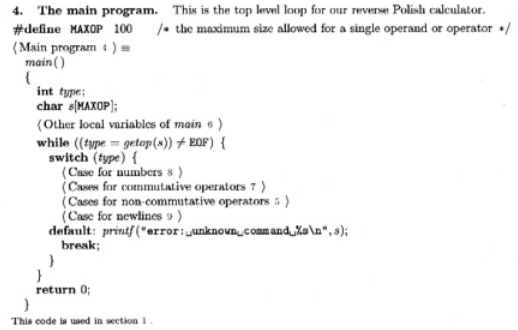
In RMarkdown, however, it is the contents of the referred chunk that are pasted in the place of reference, as in the example you give in the post:
```{r, func-full-more}
<<func-def>>
if (!is.numeric(x)) stop("The argument 'x' must be numeric")
<<func-body>>
<<func-end>>
```
The labels appear here, but in the output document, they will be replaced by the code they refer to.
My question is, can the behavior of CWEB (i.e., have the labels appear instead of the code) be reproduced in RMarkdown?
My other question is, what is your opinion about this behavior of CWEB? Do you think it makes complex programs more readable, by abstracting chunks of code not only in their definition, but also in their place of use?
yihui 2022-12-17 03:56:54I think this is a nice feature, and it does help make complex programs more readable.
Unfortunately, this feature is not available in R Markdown. It might be possible to implement it, but I'm not sure how many people would find it helpful. I feel the number of people who truly appreciate literate programing is small enough ( https://yihui.org/en/2020/02/rstudio-conf-2020/#naras-and-literate-programming ), so I doubt if many people would love to have this feature. Thanks a lot for bringing it up, though!
Originally posted on 2020-03-16 16:19:07
Guest *Nina Lopez* @ 2020-12-01 04:21:13 originally posted:
lol. Still great post. Thanks
Guest *Remy Dyer* @ 2021-07-27 06:58:51 originally posted:
Great post, and I agree strongly. Will add some comments / odd little python-data science/prototyping things I learned the hard way, which tended to make things much easier:
Jupyter notebooks have all the magics that ipython has.
Like %who which lists out all variables in the interactive namespace.
there is also '?': Have a variable 'foo' and don't remember what it was doing?
?foo
Didn't document it, but you did note down what it was in a comment where you first defined it?
??foo
That version lists the source code - which will include your comment.
Have to agree strongly about software engineering vs data science / prototyping.
I do it mixed, using jupyter lab, it's trivial to have multiple panes with different notebooks (and different kernels), and/or terminals / graphical output all in the same browser tab.
It's up to you to have the discipline necessary to ensure that everything works properly again when reloaded and run in sequence.
I do find my self doing some 'software engineering' at times: For that I just run vim and git commands in a terminal, with a subdirectory python module being its own git repo, and use the %autoreload / %aimport magic in the notebook(s) so that code that gets saved there is automatically discovered without having to re-import it each time it changes.
Only stuff I find myself copy/pasting more than a couple of times gets functionalized, and only those functions I find myself actually using from notebook to notebook make it into the git module.
Which, being its own git repo, means I can easily have multiple project directories, each with their own copy of that git module, and possibly each their own branch (should that be necessary). Git push/pull etc works to update changes around, when required. Otherwise I like to leave the code close to data, and it's a good idea to use something like python poetry to ensure all deps have fixed versions too.
I also tend to use the %load magic to load at least a 'first' cell - the one with all the imports and setup magics in it, so I can quickly be up and running with a new blank notebook, rapidly loading in the functions to then load specific data.
Final piece of the puzzle is a little python library called tqdm
It's particularly good with large data which might take many minutes to an hour to load/process. It shows a live progress bar, with an ETA.
%matplotlib widgets allow interactive plotting / zooming into quite large graphs, it's even possible to do simple guis with ipywidgets, to ease data segmenting.
For tabular stuff there's pandas, for raw 'pcm' numpy, an d openpyxl is quite good at generating excel files to contain the reduced data for the boss that insists upon them (even down to tweaking cell widths and inserting formulae / graphs).
This all tends to work so well, the next limit becomes the RAM on the system the browser is running in! (I have maxed out a Xubuntu 20.04 LTS system with 48 GiB ram, having too much loaded at once. No reboots required - just save and kill notebook kernels, ctrl-refresh the browser then clean out swap with swapoff -a; swapon -a. And all is as good as new).
Finally, starting jupyter lab from within a tmux session, means you can come and join it remotely, after having gone home having left it running. This makes it easier to transistion between working remotely /back at work, since you only need to reconnect a browser as appropriate, and maybe re-run the %matplotlib widget magic.
Sign in to join the discussion
Sign in with GitHub